
If you are unable to add more members to your Board, Worklist, or Workspace, it’s typically because you have reached the maximum user limit allowed by your current ButtonShift subscription.
Here is a breakdown of the common limits and the action you need to take:
1. Reaching Your Plan’s Limit
Your ability to add members depends on the type of plan you are using:
- Starter Plan (Free): You are limited to 3 members per board including yourself. With the 5 free boards in a Starter Plan, you can have a maximum of 10 members in your workspace apart from yourself.
- Pay-as-you-Go: Your member count is set when you purchase the board. You can select up to 10 members per board (options include 3, 5, or 10). If you have reached your chosen limit, you cannot add more until you increase the member count for that specific board.
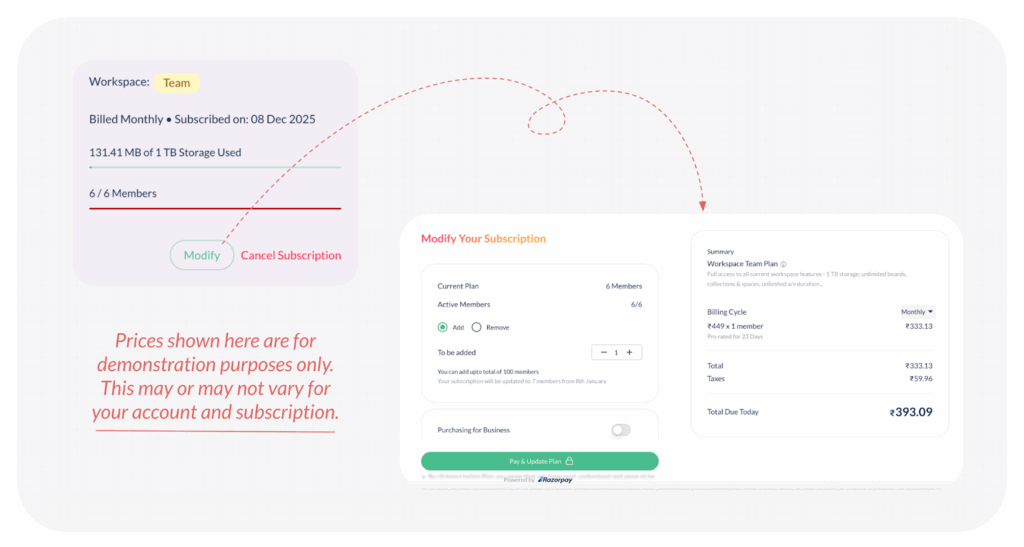
- Team Plan: You subscribe to a specific team size plan initially (e.g., 15 Members). If the actual count of members in your workspace reaches 15, you will be required to first purchase new seats before adding new members.
Note: You can remove existing members from your workspace (if they are no longer required), and add new ones without having to purchase additional seats.
2. Solution: Increase Your Limits
To continue adding team members, you will need to increase your subscription limits:
- If you are on the Starter Plan: You must upgrade to a Pay-as-you-Go board or a Team Plan to increase your member allowance.
- If you are on Pay-as-you-Go: You need to revisit the settings for that specific board and purchase a higher Member Count limit (e.g., upgrade from 5 members to 10 members).
- If you are on the Team Plan: To accommodate more members as your team grows, you will need to simply modify your subscription by adding the required number of seats and pay the pro-rated charges.
Visited 6 times, 1 visit(s) today
Was this article helpful?
YesNo
Last modified: December 17, 2025
