
Boards and standalone files in ButtonShift utilise a set of distinct roles to manage content creation, review, and final approval efficiently. Each role has specific rights that determine what actions they can perform on the content.
The five different roles within a Standalone file and Board are: Approver, Creator, Reviewer, Collaborator, and Viewer.
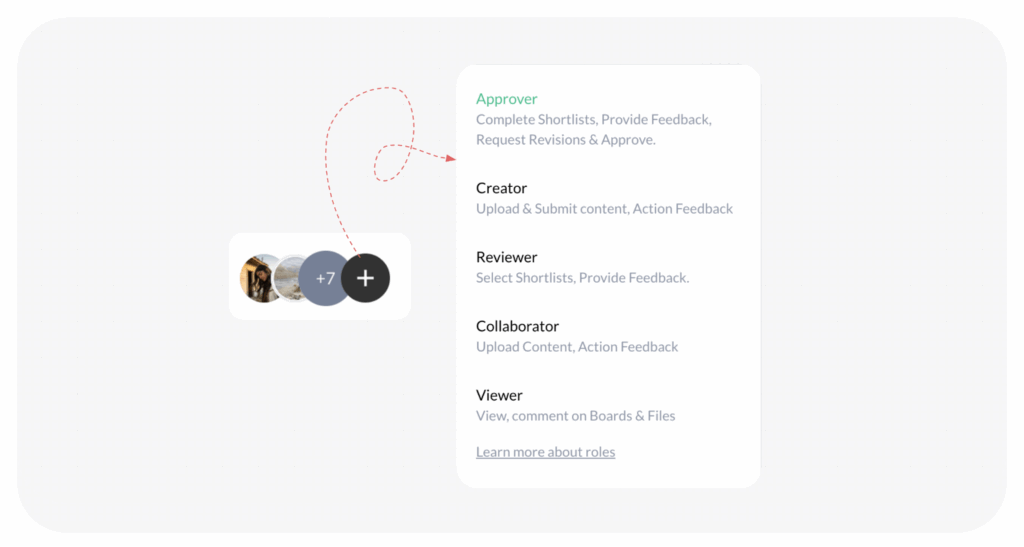
Roles and Their Key Permissions
The table below summarises the core abilities granted to each role on a Board:
| Role | Key Abilities |
| Approver | Add Feedback, Request Revision, Approve Content. Can Initiate ‘Reverse’ workflow by uploading file/s, adding feedback & requesting revision. |
| Creator | Submit Content for Review, Add Versions, |
| Reviewer | Add Feedback (Provides Input, No Direct Workflow Control) |
| Collaborator | Add Content (No Direct Workflow Control) |
| Viewer | View, Add Feedback |
Breakdown of Specific Role Capabilities
1. Approver
The Approver holds the primary responsibility for the final decision in the workflow.
- Workflow Actions: They can add Feedback, Revise and Approve boards and files
- Management Actions: They can Create sub boards, Upload Files, Cleanup board, Set deadline, and Follow up.
2. Creator
The Creator is responsible for developing and submitting content for review.
- Workflow Actions: They can Submit board and files for review
- Management Actions: They can Create shortlist board, Create sub board, Upload Files, Cleanup board, Set deadline, and Follow up.
3. Reviewer
The Reviewer is brought in primarily to provide input on the content.
- Content Access: They can Add Feedback & Upload Files if required.
- Note: The Reviewer cannot initiate or finalise the workflow (they cannot revise, or approve the board).
4. Collaborator
The Collaborator assists the Creator with content contribution.
- Content Access: They can Create shortlist board, Create sub board, Upload Files.
- Note: The Collaborator cannot initiate the workflow.
5. Viewer
The Viewer has the most limited permissions, designed for monitoring progress only.
- Access: The only action they can perform is to add feedback and comments on content.
- Limitation: They cannot upload, create, edit, delete, or participate in any workflow actions.
Note: All roles (except Viewer) can create group chat and view board insights. Any member can edit or delete assets they have created themselves.
Last modified: January 6, 2026
